I needed a simple image editing tool and did not want to pay a subscription for it. So I built one for my own use.
The job was never complicated: crop a screenshot, resize an image for a page, shrink a PDF so it would go through email. Every tool I found for it either wanted a monthly fee, wanted me to upload the file to a server, or both. Uploading documents to a stranger's server to make them smaller never sat right with me, and paying every month for a crop button sat worse. So I built Image & PDF Compressor, and I am just happy that other people are using it daily.
What it does
Everything happens locally in your browser. Files never leave your computer: no servers, no uploads, no tracking, no account, and it works offline.
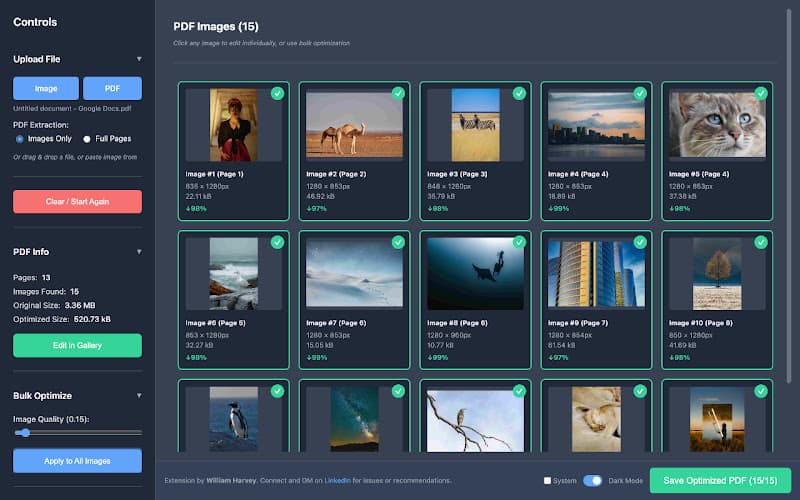
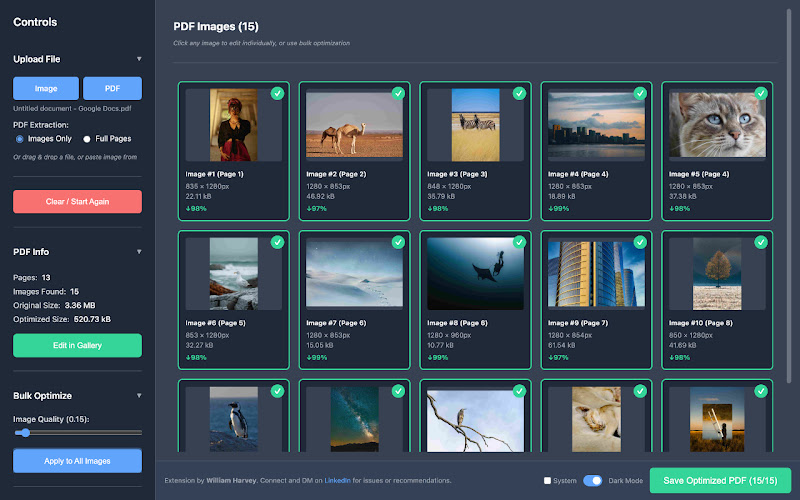
PDF optimiser. It extracts every image inside a PDF, compresses them, and rebuilds the document with the text and layout preserved. Typical results are 50 to 80 percent smaller, and photo-heavy documents shrink far more. You can bulk optimise all the images at one quality setting, or open each one and crop, rotate or resize it individually, with a before-and-after zoom preview so you can see what you are giving up.
Image editor. Crop with aspect ratio presets (1:1, 4:3, 16:9), rotate, flip and resize, convert between JPG, PNG and WEBP, and choose the compression quality from 75 to 100 percent, with a side-by-side comparison.
One-click from any page. Right-click an image or a PDF on the web, choose "Edit with Simple Editor", and it opens in the editor. There are keyboard shortcuts too: Ctrl or Cmd plus Shift plus E opens the editor, Ctrl or Cmd plus V pastes an image from the clipboard, and Ctrl or Cmd plus S saves the current image.
What people use it for
The use cases turned out to be the same as mine. Turning a 15 MB report into 3 MB so it does not bounce back from a mailbox. Meeting the file size limit on a portal or a submission without the document looking worse. Optimising images for a website so pages load faster. Freeing up cloud storage by compressing archived documents.
Why it matters that it is local
Compression is a job where the file is the whole point, and the files people compress are often the ones they least want on someone else's server: contracts, reports, scans of identity documents. Doing the work in the browser removes the question entirely. It also means there is nothing to pay for, because there is nothing to run.
It is on the Chrome Web Store as Image & PDF Compressor: 100 percent free, no account required, works offline. Your files, your computer, your privacy.